Showing posts with label websphere portal. Show all posts

Friday, June 19, 2009

WebSphere Portal Sametime chat issue on IE8

From WebSphere Portal 6.1.0.1, users are using sametime chat through the web browser. After upgrading to Internet Explorer 8, the sametime chat window can be open but the chat functionality is not working. If a person pings you, a chat window opens but the screen remains empty.

To solve this, add in IE8 into the supported client in the portal administration. Go to Admin Page -- Portal Settings -- Supported Clients.

Initially, the lastest version is IE7. Thus make add a new client with IE 8. All the settings can be the same as the IE7 settings except the User Agent and Version.

After restarting the server, the sametime chat is working fine through IE8.

Wednesday, June 10, 2009

WebSphere Portal.Next Beta - WCM first look

WebSphere Portal.Next Beta is now available. You can get more infomation from the wiki link here.

I have just install it and have a first look at the WCM. First thing you will notice is the additional navigation available at the top area.


Going into the Edit Shared Setting, in the Rich Text Options, there are three option, Standard Editor, Legacy Editor and Custom Editor. By default Legacy editor is selected. To test out the Ephox editor, the Standard Editor have to be selected.


Below is the sample of the Standard Editor (Ephox)


If you go into the Manage Page in the administrator, there's a new option New Web Content Page. This option is available for portal 6.1.0.2 if you install the new Web Content Management Rendering Portlet. That is available at the Portal Catalog.


For this option you can select which content to be display in the page directly and also what template to be use.


It is just a short brief look. I will spend some more time on that later and look into the features in more details.

Thursday, May 07, 2009

Portlet Factory - Web Service Call builder, No trusted certificate found

I am using the Web Service Call builder and testing a call to a https site. When running the application, it return the error "No trusted certificate found".

From the error message, I suspected that the server does not recognise the SSL certification for the site that I'm accessing. Refering to this document, the SSL cert have to be exported and added into the server. Please take note that WebSphere 6.0 used ikeyman to add in the cert while 6.1 is done through the admin console.

Wednesday, March 04, 2009

Adding portlet into People Palette or Content Palette page in WebSphere Portal 6.1

I want to add the Sametime Contact List portlet into the People Palette page in WebSphere Portal 6.1. First thing you will notice is that the page design is lock so you cannot add in any extra portlet. So unlock the portlet area to put additional portlet.

After putting in the Sametime Contact List portlet, I tried to view the People Palette but it is not showing. On IBM support page - Theme does not allow the addition of portlets to flyouts. This is a solution for Portal 6.0. The people finder portlet in the page is automatically maximise thus any additional portlet is hidden. If you restore the people finder portlet, you can see the portlet that is added.

In WPS 6.1, you cannot use the fix from the list. The fix can be done at the theme page, flyout.jspf. On the line

<portal-navigation:urlGeneration contentNode='ibm.portal.People Palette' layoutNode='ibm.portal.People Palette Control' newWindow='true' portletWindowState='Maximized'>


You can remove the portletWindowState='Maximized'. This will show the portlets in default state. Thus when open the people palette page it can show multiple portlets immediately.

This also applies to the Content Palette page.

<portal-navigation:urlGeneration contentNode='ibm.portal.Content Palette' layoutNode='ibm.portal.Content Palette Control' newWindow='true' portletWindowState='Maximized'>

Friday, February 27, 2009

Portlet Factory update design shortcut tips - copy model directly

When developing in Portlet Factory, I do the testing on my local server because it is faster than deploying onto the development websphere portal server. But somethings we have to develop and test directly in a portal server. What you have to do is to deploy the project onto the portal server. As you know the deployment will take some time. So a faster way is to copy the model directly from your Portlet Factory Eclipse workspace into the Portal deployment path.

From
<workspace path>\<project>\WebContent\WEB-INF\models\helloworld.model

To
<portal wp_profile path>\installedApps\<cell>\<app.ear>\<app.war>\WEB-INF\models\helloworld.model

Once you copy from your workspace to the server. Log out of the portal and log back in. Presto, the model update is there. This is only recommended for development and testing purposes only. For production environment it is better to package the project and update the application deployment.

Tuesday, February 03, 2009

IBM Lotus Web Content Management Rendering Portlet

IBM have release an update to the Web Content Viewer portlet. You can download it from the portlet catalog.

The IBM® Lotus® Web Content Management Rendering Portlet provided with this package is a solution which updates and improves how the rendering of Web content is performed in IBM WebSphere® Portal. While the existing Web Content Viewer portlet (referred to in the WebSphere Portal documentation as a "rendering portlet") has evolved throughout several versions to implement sophisticated Web content rendering functions, it is still based on the deprecated IBM Portlet API. By contrast, the new JSR 286 Web Content Viewer has been entirely redeveloped based on the Java™ Portlet Specification 2.0 (JSR 286). In addition to the benefits afforded by JSR 286, the JSR 286 Web Content Viewer in this package also enables other features for Web content management, such as a new Web content portal page type and support for the standard search seedlist 1.0 format.

Wednesday, January 14, 2009

Portlet Factory 6.1.2

Portlet Factory 6.1.2 is out. You can get the 60 days trial version here.
It looks like 6.1.2 is a new version and not an upgrade or fixpack for PF 6.1.

Friday, January 09, 2009

Highlighted Selected Content in Menu - WebSphere Content Management System

In a WebSphere Portal page, I inserted a few Web Content Viewer portlets. The top portlets shows a menu list the content. The bottom portlet will display the selected content from the list. The issue I had was highlighting the selected content in the menu.

From the forum, there were some suggestions but it didn't work for my case.

I manage to solve it by using the Content ID. The idea is, when the content is loaded, it can find which link in the menu is selected by the Content ID. Thus you can add in code to change the attributes.

In the menu component, I add in a class which is the content ID into the links.

<A HREF="<Placeholder tag="href"/>" class="<Placeholder tag="Idnum"/>"><Element context="autoFill" type="content" key="headline"/></A>


Then in the presentation template I added dojo code to put in another class into the selected content.

<script>
dojo.addOnLoad(function(){
dojo.query(".<IDCmpnt context="current" type="content" field="id"/>")
.addClass("selectedContent")
});
</script>
<style>
.selectedContent{color:black;font-weight:bold;}
</style>


Thus when the content is loaded, it will search the page for the class <Idnum> and add in the class selectedContent. For the Idnum here, I use a class instead of id because in certain pages, there are more than 1 links to the same content.

Friday, December 26, 2008

Prepend javascript to an action button - Portlet Factory

I am creating a form, which is submitted and a thank you page is display. Only the Form section is change to Thank You after submission, without refreshing the whole page.

I used a Button builder and set that in the Post-Action Behavior. The issue that I had was when submitting, the button stays active. If the connection is fast, it does not matter but when I was working at a slow connection place, when submitting, it takes a few seconds before the Thank you page shows but the button is still active.

The button calls an action. I want the button to run additional Javascript before running the action. From the forum, I manage to find the solution.

The HTML Event Action can be used. Select the location you want to insert the javascript. Action type, I use "Run a script". Then put in the javascript. In Advance, use Prepend new value.


This is very useful to add in more actions before the button action is triggered.

Thursday, November 20, 2008

Marking portal pages as hidden under the content root

In WebSphere Portal, when creating a new page under content root, it will be shown on the quick links navigation.
If you do not want a page that you create to appear in the main menu, you can hide the page. You can use own customize links or navigation to access the page via direct URL mapping.

To hide the page, it can be done through WebSphere Portal XML configuration interface. You do this by setting the hidden flag for the page parameter for the content-node tag in XML. You can use the following XML snippet:

<request xmlns:xsi="http://www.w3.org/2001/XMLSchema-instance" xsi:noNamespaceSchemaLocation="PortalConfig_1.4.xsd" type="update" create-oids="true">
<portal action="locate">
<content-node action="update" uniquename="com.mypage" active ="true">
<parameter name="com.ibm.portal.Hidden" type="string" update="set"><![CDATA[true]]></parameter>
</content-node>
</portal>
</request>

Make sure the uniquename is correct. You can get further details here.

This is a lot of work to achieve a simple thing. Wouldn't it be great if there's an option at the page property to hide or show it in the navigation.

Friday, October 03, 2008

WebSphere Portal V6.1.0.1 Beta

Here's a simple way to get people started to test / pilot WebSphere Portal.
IBM WebSphere Portal 6.1 Beta, Its the NEW beta 1, release of WebSphere Portal V6.1.0.1 Beta. It is available on VM Suse image. Just load the VM image and start the server. As simple as that.

Thursday, October 02, 2008

Configuring WebSphere Portal for site analysis logging

I have been missing in action for quite a while. My connection was limited because my previous company block most of the blogging sites. I have just join a new company and partial of my time will be located in Denmark. What suppose to be a Lotus Domino job turns out to be more working on WebSphere Portal. Luckily I have previous experience to let me carry out my task.

The portal implementation here is still on going. Thus one thing I can for see is that they will need statistic on the number of logons and pages access. By default WebSphere site analysis logging is not enable. Thus I took the initiative to enable the logging.

1) Open WebSphere admin console
2) In the navigation open the Resources section
3) Click Resource Environment Providers.
4) In the Resource Environment Providers frame make the following selection, depending on your environment:
* If running standalone, select Browse nodes and select the node.
* If installed in a cluster, select Browse Clusters and select the cluster.
5) Select the service to which you want to make changes. In this case select "WP SiteAnalyzerLogService"
6) Click Custom Properties. More info can be found here.
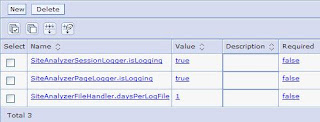
7) Restart the server to make the changes become effective.


Awstats can be use to present the generated logs in more friendly manner. There is an article here describing the steps.
Alternate to this, you can use third party tools. If your company policy allows, free site tracker can be used too. I have been using Google Analytics for some sites, it is easy to setup and it does provide detail informations.

Friday, August 17, 2007

Portletize Lotus Notes Application - Part 1 (Profile Sets)

From the existing samples in Portlet Factory (PF), you can get a simple Lotus Notes (LN) application up and running in no time. I will skip the most details covered in the sample.


By using just a Domino View & Form builder, you can get the most simple function of viewing, creating, editing and deleting documents. When setting up the builder, you have to put in the property file for the Domino connection, Database Name, etc. Development and production server should have different settings.

In LN, I normally use profile document. The profile document would contain settings that is needed for the application to run. Same for PF, we can use Profile Set also. Profile Sets contains one or more profiles entries. There's a sample on PF samples page on how to use the profiles feature.


An example that we can use here is to set a profile for the Database name. In my environment, production path and development path is different. Thus for the application to run, it have to point to the correct database path. First, create a Profile Input for the Database name. If a profile set does not exist, you can create a new profile set. Then create a new Profile Entry name DatabaseName type text. I give it a default value to the development server database path.


Next is to set the entries configurable on the portal. Add in a Portlet Adapter builder to create the portlet. Then scroll down to Portlet Sets section. There should be a list of Profile Sets that is created. For those that you want to be configurable, it can be set to "Show individual profile values in Configure". You may want to check on "Require Configuration". This would force the portlet to be configured during deployed before it can be used.


I received a portlet application from a team and it needs code changes everytime it is deploy in development and production. This cause a lot of issue when they forget to make the changes. Thus using the Profile Set example above, it provides a more flexible way to deploy application to different environments.


Add to del.icio.us

Friday, July 27, 2007

Websphere Portal Server implementation

I have not been updating my blog lately. So now I'm trying to put together what I have been learning for the past 2 month. Been busy setting up the new Websphere Portal (WP) infrastructure for my company. It have been quite a long process. WP is like 1000 pieces puzzle compare to Lotus Domino 100 pieces puzzle. There are so many things to do to get a proper WP environment up and running. And there are still fine tuning to be done. Maybe we lack in experience for WP but definitely it is not a simple system to setup.

Next is the development of some portlet applications. I have familiarize myself with Portlet Factory and managed to portletize some Lotus application. In my previous job, I have created portlet using Websphere Studio Application Developer (WSAD). Definitely Portlet Factory has made it much easier to than WSAD. Almost every now and then I find some cool feature in Portlet Factory. I will share more of this in the next few writeup of how I've portletize an Lotus Application.

Through so many Lotus blogs, I have learn so much. Lotus community have been very willing to share their experience and that is great. I'm hoping to learn from Websphere Portal/Portlet Factory blogs. I did a quick search on Google for Webpshere Portal Blog and Portlet Factory Blog. What a let down. I manage to find only a handful of blogs and not all of them are updated. If you know any good Guru out there, appreciate you could leave the URL on the comments. I did a search on Lotus Notes Blog and can definitely see the big different in numbers of blogs. Hmm... do Lotus community have more time to blog? Maybe Lotus tools have make things simpler thus we have more time to blog.

Thursday, April 19, 2007

Websphere Portlet Factory

Just installed Websphere Portlet Factory (WPF) and test it out a bit. My previous experience of developing portlet is using Websphere Studio Application Developer (WSAD), now called Rational Application Developer (RAD). Definitely WPF is much simpler to get started with, for developing portlets than WSAD.

I manage to built a simple portlet to display a Domino application view and document in a few minutes. Basically a few builders in a portlet factory model would do the job. But this just create the WPF provided standard view and display all the fields in the document. It would take more work to customized to the way we may want it to be. But still so far, no Java coding yet. Good new ya.

Will spend more time learning up WPF. Definitely it is much easier to learn than building portlet in WSAD. This hold true especially for those who are still going to learn Java :) Let just see how far we can built portlet application using WPF without JAVA codings. Will update my findings soon.

Tuesday, April 10, 2007

Websphere Portal iFrame portlet on IE 7

I was testing an Websphere Portal v6.0 iFrame portlet. It was working on IE 6.0 and Firefox. But on IE 7, I get the error message below.

The portlet cannot be displayed because your browser does not support iframes.

My first impression was that IE7 support for iframe was disable. So I check the IE settings and it seems alright. After some searching around, I found the problem is not with IE7. It's a known issue but can be easily solved. Go to the Portal Administration -> Portal Settings -> Supported Clients. The list of supported client is listed there. IE 7 is missing. Just "Add new client" and filled up the information as per MSIE 6.0. Only the information below needs to be changed

User Agent:
.*MSIE 7.0.*

Version:
7.0

It would be much easier if we could make a copy of the IE 6.0 client setting and make the necessary changes only. Any portlet guru who can modify the Supported Client setting portlets to have additional copy function?

Looking forward to play around more with Portal Server.