Showing posts with label dojo. Show all posts

Friday, January 09, 2009

Highlighted Selected Content in Menu - WebSphere Content Management System

In a WebSphere Portal page, I inserted a few Web Content Viewer portlets. The top portlets shows a menu list the content. The bottom portlet will display the selected content from the list. The issue I had was highlighting the selected content in the menu.

From the forum, there were some suggestions but it didn't work for my case.

I manage to solve it by using the Content ID. The idea is, when the content is loaded, it can find which link in the menu is selected by the Content ID. Thus you can add in code to change the attributes.

In the menu component, I add in a class which is the content ID into the links.

<A HREF="<Placeholder tag="href"/>" class="<Placeholder tag="Idnum"/>"><Element context="autoFill" type="content" key="headline"/></A>


Then in the presentation template I added dojo code to put in another class into the selected content.

<script>
dojo.addOnLoad(function(){
dojo.query(".<IDCmpnt context="current" type="content" field="id"/>")
.addClass("selectedContent")
});
</script>
<style>
.selectedContent{color:black;font-weight:bold;}
</style>


Thus when the content is loaded, it will search the page for the class <Idnum> and add in the class selectedContent. For the Idnum here, I use a class instead of id because in certain pages, there are more than 1 links to the same content.

Thursday, February 08, 2007

dojo.dom cheatsheet

I find myself keep searching for the same documentation for some of Dojo function. As I mention before the documentation site is quite slow to load from here. So I decide to compile some locally for my own quick reference. Here to share with you all is the first one, dojo.dom Cheatsheet. The information is accurate according to Dojo documentation site.

Add to del.icio.us

Wednesday, February 07, 2007

Sortable Column View using Dojo FilteringTable

In Lotus Notes client, we can set the column in a view to be sortable. I use Dojo FilteringTable to mimic the sortable column. In this example, it only works for flat view or view without categories. I'm using Dojo 0.4.0 here.

First create a $$ViewTemplate. This is needed to attached in the required Dojo libraries and the generation of the FilteringTable. Insert the embedded view and set the Display to "Using HTML". For simplicity, add a div around the embedded view. It is used by the function to pick up the table inside it to be formated. Give it a name, eg. "viewdiv". Make sure only the text is pass through HTML. If the embedded view is also pass through, it won't be displayed.
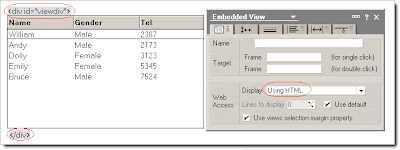


In the HTML Head Content insert the code below. Change the "dojopath" to where you store your dojo. Import this js file into the database.

"<script type=\"text/javascript\">"+@NewLine+
" var djConfig = {isDebug: true};"+@NewLine+
"</script>"+@NewLine+
"<script type=\"text/javascript\" src=\"/" + dojopath + "/dojo-0.4.0/dojo.js\"> </script>"+@NewLine+
"<script type=\"text/javascript\" src=\"/" + @WebDbName + "/LNFilteringTable.js\"></script>"


Then in the JS Header insert the require dojo Library. When the document load then call the function createFilterTable(ViewDivName).

dojo.require("dojo.widget.FilteringTable");
dojo.hostenv.writeIncludes();

dojo.addOnLoad(init);

function init(){
createFilterTable("viewdiv");
}

Domino by default will generate a HTML table for the view. What the function does is to format the table for the Filtering Table. The first row id moved out of the body to a newly created table head (thead). This is used for sorting the columns. Then each of the row need to have a value. The anchor link href is extracted as the value of the row. The anchor links also need to be removed because they will affect the sorting. To replace the links, double click event is added on each row to open the document. Below is the sample end result.
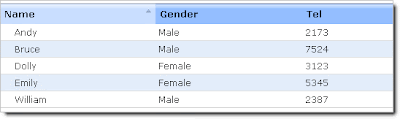


The generated table is without any formatting. To make it look as the image above, use CSS for the layout. Import the dojo FilteringTable sample images for the column header into the Image Resources (ft-head.gif, ft-headup.gif & ft-headdown.gif). I used a page to create the CSS. Use @WebDbName for the <ComputedValue>.

#viewdiv table {width:100%;border:1px solid #ccc; border-collapse:collapse;}
#viewdiv table td, table th {padding:4px;font-weight:normal;}
#viewdiv table thead td, table thead th {background-image:url(/<ComputedValue>/dojowidget/ft-head.gif);
background-repeat:no-repeat;background-position:top right;padding:6px;font-weight:bold;}
#viewdiv table thead td.selectedUp, table thead th.selectedUp {background-image:url(/
<ComputedValue>/dojowidget/ft-headup.gif);}
#viewdiv table thead td.selectedDown, table thead th.selectedDown {
background-image:url(/
<ComputedValue>/dojowidget/ft-headdown.gif);}
#viewdiv table tbody tr td{border-bottom:1px solid #ddd;}
#viewdiv table tbody tr.alt td{background: #e3edfa;}
#viewdiv table tbody tr.selected td {background: yellow;}
#viewdiv table tbody tr:hover td {background: #a6c2e7;}
#viewdiv table tbody tr.selected:hover td {background:#ff9;}
For future enhancement, I will add in the filtering functions. At the mean time, download this js file and tried it out.

del.icio.us

Thursday, January 25, 2007

Dojo API documentation site frustration

I head out to Dojo API site to check some stuff. It look way so long to load the main page (> 3 minutes). There are more than 50 objects (I stop counting... should be close to 80-90 objects) that is loaded. I already frustrated to be stuck in some Dojo stuff and now I have to wait for so long to look at their API documentation. Not to mention that it is still not completed yet.


With so many different javascript framework out there, Dojo really have to buck up here. A good example is YUI. It have comprehensive documentation. The documentation is also available in the download so you can refer to it locally.

Tuesday, January 16, 2007

Debugging Dojo using Firebug and Greasemonkey

Debugging in Dojo is easier than ever. Shane O’Sullivan posted a great script using Greasemonkey to log the debug using Firebug.

From his blog:

The solution is to use a Greasemonkey script to enable Dojo/Firebug debugging on any page you visit, or only for pages in a given list of domains. The steps to use this script are as follows:
  1. Install Greasemonkey from http://greasemonkey.mozdev.org/
  2. Install Firebug from http://www.getfirebug.com
  3. Open the file http://www.skynet.ie/~sos/misc/dojo_debug_enable.user.js in Firefox. Greasemonkey should prompt you to install it.
That should be all that’s necessary.

You can always enable or disable the script directly in Greasemonkey.

Thursday, January 04, 2007

Quick Tips - dojo.dom

When extracting text from a DOM node (HTML or XML), different browser have different method to do it. In IE node.text() while Firefox node.textContent().

Dojo provide a simple way to extract the text content.
dojo.dom.textContent(node)

So far I've tested it on IE and Firefox and it is working fine. I do not need to check for the browser myself. Try it out.

Tuesday, October 31, 2006

Client User Interface on Web: Preview pane on web

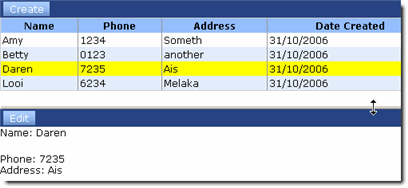
I finally get some time to sit down and do an example of a very simple application with dojo. I've created a split vertical pane. The top pane will display the view and the bottom pane (preview) will display the form (edit and saving).

You can download the example here. Remember to sign the database first.

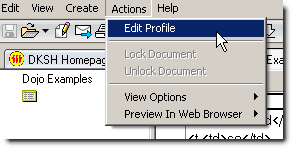
First setup where you store your dojo library. Open the profile document from the menu "Action --> Edit Profile".


Enter the path of the dojo.js. for eg "/WebTool/Dojo.nsf/dojo-0.3.1/dojo.js". Here I store dojo in a nsf template. You can also store it directly at the Domino server HTML directory.

First the view. I used SortableTable. The view (hvPerson) generates the html table body. $$ViewTemplate is use to create the rest of the table for the SortableTable. In each row, the document unique id is inserted in the <td> tag as a value. This will be use to retrieve the selected document from the table.


The "Create" button will retrieve the form (dfPerson). Domino form will create the full HTML source by default. So when it is retrieved, we only need the Form portion to be display in the preview area.


When saving the form, we can directly use the form action for submission. Just pass in the form to dojo.io.bind and it will handle the submission. This is the same when saving a existing form. The best part is, even the WebQuerySave works. So this is really a convenient function to use.

I have just touch the surface of how "Client" like application can be built on the browser. To those dojo guru out there appreciate if you could feedback on the code used here. I put together the this sample application referring to the dojo demo application and responses from this forum.
Download the sample and try it out.

Wednesday, October 18, 2006

Client User Interface on Web

There are so many different javascript framework available for download. To name a few prototype, dojo, yui.... etc. The list goes on. I've been using prototype for quite a while and like it. The $ function, some of the DOM, event and array functions are quite easy to use.

Now I'm looking for something that can help me build a client like application on browser. Dojo provide a lot of building client like functions, eg. browser windows, menu bar, just to name a few. YUI is gaining a lot of reputation for their set of library. So which is better? Or should I stick to prototype & scriptaculous?

I ended up giving dojo a try. Dojo definitely have quite a lot of build in functions. But it's quite heavy too. The full dojo.js compress is 127 KB. That doesn't take into consideration of the many different library that need to be imported for different functions.

First impression, documentation is needs to be improved. I can't find offline documentation that can be downloaded. The API doc and the manual is all online. But I still gave it a further look.

Going through some of the examples, I found something that I can start with. I like the ContainerPane and the SplitPane. I can build layout without worrying about the CSS of the different panes in a page. The spilt pane provide resizable panel. That's nice.

Then I jump to AJAX calls. Dojo provide an IO library for that. Dojo even provide crossed domain AJAX calls through IFrame I/O. What I like is the form submission. That's what's I was looking for.Lotus Notes form itself have the required submission action url. Using dojo.io, AJAX posting of the form can directly use the existing url. This is convenient.

Using both function above, a view with preview pane can be created similar like in LN Client. user can browse through the view documents without refreshing the page. The document can be set editable and save within the same page. I'll be drafting the steps to create the example describe above. Keep a look out.