Sunday, October 26, 2008


Monday, October 20, 2008
My Wife blog
Friday, October 03, 2008
WebSphere Portal V6.1.0.1 Beta
Here's a simple way to get people started to test / pilot WebSphere Portal.
IBM WebSphere Portal 6.1 Beta, Its the NEW beta 1, release of WebSphere Portal V6.1.0.1 Beta. It is available on VM Suse image. Just load the VM image and start the server. As simple as that.
IBM WebSphere Portal 6.1 Beta, Its the NEW beta 1, release of WebSphere Portal V6.1.0.1 Beta. It is available on VM Suse image. Just load the VM image and start the server. As simple as that.
Thursday, October 02, 2008
Configuring WebSphere Portal for site analysis logging
I have been missing in action for quite a while. My connection was limited because my previous company block most of the blogging sites. I have just join a new company and partial of my time will be located in Denmark. What suppose to be a Lotus Domino job turns out to be more working on WebSphere Portal. Luckily I have previous experience to let me carry out my task.
The portal implementation here is still on going. Thus one thing I can for see is that they will need statistic on the number of logons and pages access. By default WebSphere site analysis logging is not enable. Thus I took the initiative to enable the logging.
1) Open WebSphere admin console
2) In the navigation open the Resources section
3) Click Resource Environment Providers.
4) In the Resource Environment Providers frame make the following selection, depending on your environment:
* If running standalone, select Browse nodes and select the node.
* If installed in a cluster, select Browse Clusters and select the cluster.
5) Select the service to which you want to make changes. In this case select "WP SiteAnalyzerLogService"
6) Click Custom Properties. More info can be found here.
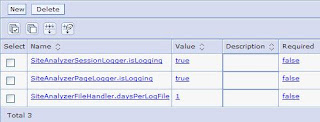
7) Restart the server to make the changes become effective.
Awstats can be use to present the generated logs in more friendly manner. There is an article here describing the steps.
Alternate to this, you can use third party tools. If your company policy allows, free site tracker can be used too. I have been using Google Analytics for some sites, it is easy to setup and it does provide detail informations.
The portal implementation here is still on going. Thus one thing I can for see is that they will need statistic on the number of logons and pages access. By default WebSphere site analysis logging is not enable. Thus I took the initiative to enable the logging.
1) Open WebSphere admin console
2) In the navigation open the Resources section
3) Click Resource Environment Providers.
4) In the Resource Environment Providers frame make the following selection, depending on your environment:
* If running standalone, select Browse nodes and select the node.
* If installed in a cluster, select Browse Clusters and select the cluster.
5) Select the service to which you want to make changes. In this case select "WP SiteAnalyzerLogService"
6) Click Custom Properties. More info can be found here.

7) Restart the server to make the changes become effective.
Awstats can be use to present the generated logs in more friendly manner. There is an article here describing the steps.
Alternate to this, you can use third party tools. If your company policy allows, free site tracker can be used too. I have been using Google Analytics for some sites, it is easy to setup and it does provide detail informations.
Tuesday, February 05, 2008
Gong Xi Fat Chai
It's the time of the year again. Chinese New Year is around the corner (7th Feb). This year will be different, as I just got married. I have to give Ang Pow (red packet) instead of receiving. To all Chinese around the world Gong Xi Fat Chai.
Thursday, October 18, 2007
My wedding reception
It's almost time for my big day on 20th October 2007. Really looking forward for my wedding reception. A big thank you for those who are helping me to organised this event. It will be a poolside wedding thus praying hard that it won't rain on that day.
Here are some of my wedding bridal photos.
Here are some of my wedding bridal photos.
Tuesday, October 16, 2007
Idea Jam
Bruce Elgort has just send out the press release for the launch of the Idea Jam. Idea Jam is a site where users of IBM’s Lotus software products can exchange ideas on how to improve Lotus products. Others can help promote and/or demote ideas, as well as, providing feedback through comments. Popular ideas will rise to the top. It was developed by Elguji Software in conjunction with Matt White, and Sean Burgess. It has a nice, simple interface and runs on IBM Lotus Domino 8.0.
Site registration will open to the public on November 20th, 2007. So head on there to contribute your ideas.
Site registration will open to the public on November 20th, 2007. So head on there to contribute your ideas.
Subscribe to:
Posts (Atom)